Spring Swapping Mechanical Switches: Customizing Your Keyboard’s Feel

For keyboard enthusiasts seeking to refine their typing experience, spring swapping mechanical switches offers a powerful way to tailor the tactile feedback and actuation force of their keyboard. Whether you're looking for a lighter touch or a more satisfying click, modifying the springs in your switches can transform the feel of every keystroke. This guide walks you through the process of spring swapping, from understanding its benefits to executing the swap with precision.
We’ll start by explaining what spring swapping is and why it’s a popular choice among users who want more control over their keyboard’s performance. Next, you’ll learn how to select the right spring for your switch type, ensuring compatibility and optimal results.
Finally, we’ll walk you through the step-by-step process of spring swapping, including the tools you’ll need and how to troubleshoot common issues. Whether you’re a beginner or a seasoned modder, this article provides practical insights to help you achieve the perfect typing experience through spring swapping mechanical switches.
What Is Spring Swapping on Mechanical Switches?
Spring swapping is a modification technique that involves replacing the internal spring of a mechanical keyboard switch to customize its actuation force and tactile feedback. This practice allows users to adjust the feel of their keyboard to better suit their typing preferences, ergonomic needs, or aesthetic choices. By altering the spring, individuals can create a more personalized experience, making it a popular choice among keyboard enthusiasts and young professionals looking to fine-tune their setup.
Why Swap Springs?
Swapping springs is a way to modify the resistance and travel distance of a switch, which can significantly impact the typing experience. A lighter spring may result in a lower actuation force, making the keyboard feel more responsive, while a heavier spring can increase the resistance, offering a more tactile or clicky feel. This flexibility allows users to experiment with different weights to find the optimal balance between comfort and performance.
Compatibility and Limitations
Not all mechanical switches are suitable for spring swapping, as some are designed with fixed spring systems that cannot be altered. It is essential to check the switch type and consult the manufacturer's guidelines before attempting this modification. Compatibility can vary depending on the switch's construction, and some models may require specialized tools or techniques for spring replacement. Understanding these limitations ensures that users can make informed decisions and avoid damaging their keyboard.
Choosing the Right Spring for Your Switch
Selecting the appropriate spring for your mechanical switch is crucial in shaping the tactile experience and actuation force of your keyboard. Spring weight, measured in grams, directly influences how responsive or deliberate the switch feels under your fingers. Understanding the characteristics of different spring weights and their compatibility with specific switch types allows you to tailor your keyboard to your preferences and typing style.
Popular Spring Weights and Their Uses
Popular spring weights range from 45g to 63.5g, each offering distinct performance characteristics. Lighter springs, such as 45g, provide a faster, more responsive feel, making them ideal for gamers and typists who prioritize speed and precision. In contrast, heavier springs like 63.5g create a slower, more tactile press, delivering a satisfying 'click' or 'clack' that many users find comfortable for extended typing sessions. The 50g and 55g springs fall in between, offering a balanced feel that suits a wide range of applications.
Switch Compatibility and Recommendations
Matching the spring to the switch's housing and stem is essential for optimal function. Using an incompatible spring can lead to improper actuation, inconsistent tactile feedback, or even damage to the switch. Some switches, such as Gateron and TTC, are specifically designed for spring swapping, allowing users to experiment with different weights without compromising performance. However, other switches have fixed spring configurations, and modifying them may void warranties or cause mechanical issues. Always research the compatibility of your switch before attempting a spring swap.
How to Perform Spring Swapping on Mechanical Switches
Spring swapping is a straightforward process that allows you to customize the tactile feedback and actuation force of your mechanical keyboard. With the right tools and careful execution, you can safely replace the spring in your switch to achieve the desired feel. This section outlines the necessary tools and the detailed steps to perform the swap effectively.
- A precision screwdriver set, including flathead and Phillips head screwdrivers, is essential for disassembling the switch housing.
- Needle-nose pliers are useful for gripping and manipulating small components during the disassembly and reassembly process.
- A replacement spring that matches the original switch's specifications is required to ensure proper function and feel.
- A clean, well-lit workspace with a soft cloth or anti-static mat helps prevent damage to the switch and its components.
Tools and Materials Needed
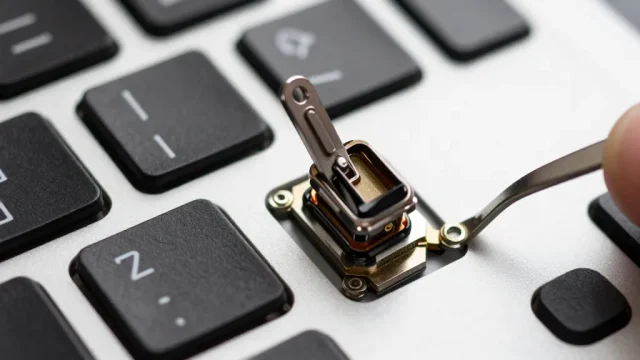
Before starting the spring swap, ensure that the switch is fully disassembled. Begin by removing the switch from the keyboard and taking out the stem. Use the precision screwdriver to carefully remove any screws securing the housing. Once the housing is open, locate the spring inside the stem and gently remove it. It is important to handle the stem and housing with care to avoid any accidental damage during this process.
Step-by-Step Swapping Process
Once the old spring is removed, insert the new spring into the stem, making sure it is seated properly. Reassemble the switch by placing the stem back into the housing and securing it with the screws. After reassembly, test the switch by pressing it a few times to ensure the new spring provides the intended feel and actuation force. If the switch feels stiff or unresponsive, double-check the spring installation and reassemble if necessary. Always test the switch in a safe environment to avoid any potential damage.
Spring Swapping and Bag Lubing: A Synergistic Approach
Combining spring swapping with bag lubing can significantly enhance the typing experience by working together to improve smoothness, responsiveness, and tactile feedback. While spring swapping adjusts the actuation force and feel, bag lubing reduces internal friction within the switch housing, allowing for a more consistent and precise keystroke.
The Role of Lubrication in Switch Feel
Bag lubing involves applying a lubricant to the switch stem and housing to minimize friction and ensure a smoother actuation. Common lubricants include silicone oil and PTFE, which are chosen for their ability to reduce resistance without compromising the switch's structural integrity. The lubricant should be applied carefully to avoid over-saturation, which can lead to sluggish performance or even damage the switch.
Pairing Spring Swapping with Bag Lubing
When pairing spring swapping with bag lubing, the order of application can influence the final feel. Some users prefer to lubricate first to ensure the switch operates smoothly before adjusting the spring tension, while others find that swapping the spring first allows for more precise tuning. Experimentation is key, as the ideal combination depends on personal preferences and the specific switch type. Both modifications should be performed with care to maintain the switch's longevity and ensure optimal performance.
Troubleshooting Spring Swapping Issues
Troubleshooting spring swapping issues is essential to ensure your keyboard performs as intended. Even with careful installation, problems like incorrect spring weight, improper setup, or physical damage can affect the switch's functionality. Addressing these issues promptly helps maintain the tactile feedback and actuation force you desire.
Common Issues and Solutions
Common issues often stem from selecting the wrong spring weight or failing to install it correctly. A switch that feels too stiff or too light may indicate a mismatch between the spring and the switch's actuation force. Improper installation can also cause the spring to shift or become misaligned, leading to inconsistent performance. If the switch housing shows signs of damage, such as cracks or warping, it may affect the spring's ability to function properly. Consulting community forums or guides can provide insights into resolving these issues, as experienced users often share solutions and recommendations.
Testing and Fine-Tuning Your Setup
Testing your switch with a spring weight chart is a practical way to determine the optimal weight for your typing style. This chart provides a reference for different spring weights and their typical use cases, helping you make an informed decision. If adjustments are needed, you can swap the spring to match your preferred feel. Always back up your keyboard's configuration before making any modifications, as this ensures you can revert to a working state if something goes wrong. Fine-tuning your setup is an ongoing process, and regular testing helps you achieve the ideal balance between comfort and performance.
Frequently Asked Questions
What are the best spring weights for a slow, tactile feel?
For a slow, tactile feel, 63.5g slow springs are ideal. They offer a smooth, linear actuation with a slight tactile bump. Pairing these with bag lubing can enhance the overall typing experience.
Can I swap springs on all types of mechanical switches?
Not all mechanical switches are compatible with spring swapping. It's recommended for linear switches, as they are designed for this modification. Tactile and clicky switches may not benefit as much and could experience performance issues.
How does bag lubing affect the spring swapping process?
Bag lubing enhances switch feel by reducing friction, complementing spring swapping. It allows for smoother actuation and can make the typing experience more consistent. However, it's not essential and should be used with caution to avoid over-lubing.
What should I do if my swapped spring feels too stiff?
If the swapped spring feels too stiff, consider using a lighter spring or adjusting the lubing. Testing different spring weights and lubricants can help achieve the desired feel. Always ensure the spring is properly seated and the switch is clean.
Final Thoughts
Spring swapping allows for customization of your keyboard's feel, enhancing typing comfort and performance. Pairing it with bag lubing can further refine the experience. Always test and fine-tune to find the perfect setup for your needs.
To get started, research the best spring weights for your typing style and gather the necessary tools. Experiment with different combinations to achieve the ideal feel for your keyboard.