Linear vs Tactile vs Clicky Switches: Choosing the Right Axis for Your Mechanical Keyboard
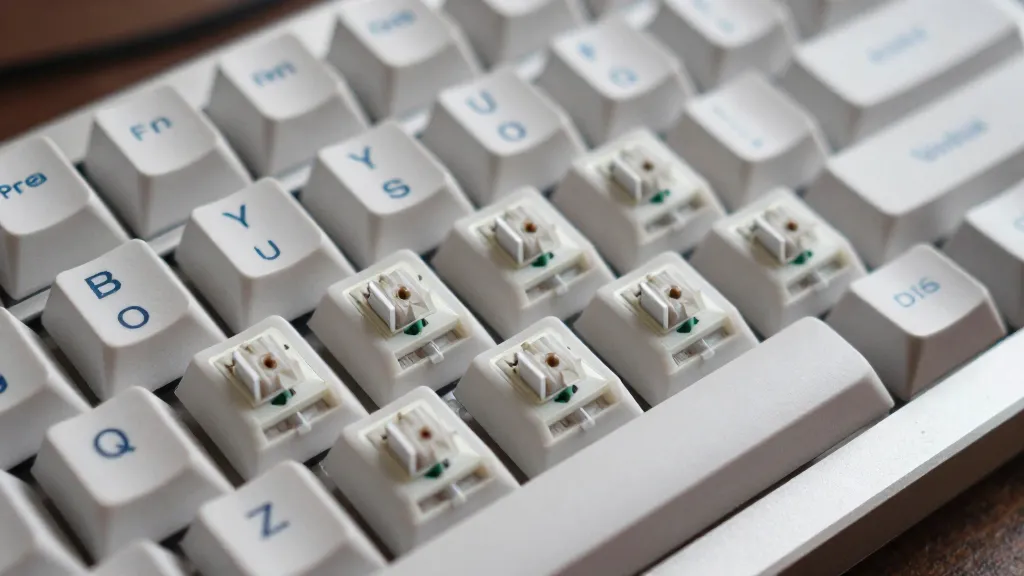
When choosing the right switches for your mechanical keyboard, the linear vs tactile vs clicky switches debate can be overwhelming. Each type offers a unique typing experience, and the right choice depends on your preferences, use case, and comfort. Whether you're a writer, a gamer, or a peripheral enthusiast, understanding the core differences between these switch types is crucial for making an informed decision. This article explores the distinctions between linear, tactile, and clicky switches, helping you choose the one that best fits your typing style and environment.
Linear switches provide a smooth, consistent feel with no tactile bump or click, making them ideal for those who prioritize speed and quiet. Tactile switches offer subtle feedback, enhancing typing precision without the noise of clicky switches. Clicky switches, on the other hand, deliver both an audible click and a distinct tactile response, appealing to typists who enjoy the sensory feedback of each keystroke.
By breaking down the key factors like actuation force and bump feel, this guide will help you compare these switch types in detail. We’ll also explore when to choose each type, based on your specific needs, and offer tips for customizing your keyboard setup for optimal performance. Whether you’re assembling a hot-swappable kit or fine-tuning your keyboard’s sound, this article provides the practical insights you need to make the right choice.
Understanding the Core Differences Between Switch Types
When selecting switches for your mechanical keyboard, understanding the core differences between linear, tactile, and clicky switches is essential. Each type offers distinct characteristics in terms of feedback, sound, and typing experience, making them suitable for different preferences and environments. Choosing the right switch depends on your typing style, noise tolerance, and the kind of feedback you need to maintain accuracy and comfort.
Linear Switches: The Smoothest Experience
Linear switches provide a smooth, consistent keystroke without any tactile feedback. The actuation is straightforward, with no bump or click, making them ideal for users who prioritize speed and quiet typing. These switches are often favored by gamers and those who type extensively without needing additional tactile cues. Their simplicity and durability make them a popular choice for both beginners and professionals.
Tactile Switches: Subtle Feedback for Typing Precision
Tactile switches offer a subtle bump or resistance when actuating, providing a tactile feedback without an audible sound. This subtle feedback helps users confirm that a key has been pressed, enhancing typing accuracy and comfort. They strike a balance between the smoothness of linear switches and the distinct click of clicky switches, making them a versatile option for everyday use. Tactile switches are often preferred by writers and typists who need a gentle yet responsive feel.
Clicky Switches: Audible and Tactile Feedback for Typists
Clicky switches deliver both a tactile bump and a crisp, audible click, offering the most pronounced feedback among the three types. The distinct sound and feel can be motivating for some users, enhancing the typing experience with a sense of satisfaction. However, they may be less suitable for environments where noise is a concern. Clicky switches are particularly popular among typists who enjoy the audible feedback and the tactile confirmation of each keystroke.
Key Factors in Switch Selection: Actuation Force and Bump Feel
When selecting mechanical keyboard switches, actuation force and bump feel are two fundamental factors that influence typing comfort, efficiency, and personal preference. These attributes determine how a switch responds to your fingers and how much control you have over your typing rhythm.
Actuation Force: How Much Pressure Do You Need?
Actuation force refers to the amount of pressure required to register a keystroke. This measurement is typically expressed in grams (g), with lower values indicating a lighter touch and higher values suggesting a more deliberate press. For fast typists, a lower actuation force—often between 45g to 50g—can enhance speed and reduce finger fatigue. Conversely, higher actuation forces, such as 60g or more, offer a more substantial feel, which some users prefer for its deliberate and controlled typing experience.
Bump Feel: The Tactile Feedback That Matters
Bump feel is a tactile response that provides feedback when a switch actuates, helping users confirm that a keystroke has registered. This is especially important for those who type without looking at their keyboard. Tactile switches often feature a distinct bump feel, which gives a subtle 'click' sensation without an audible sound. Clicky switches, on the other hand, combine this tactile feedback with an audible click, creating a more pronounced and satisfying typing experience. The presence and intensity of bump feel can significantly impact typing accuracy and comfort, making it a crucial consideration for users who prioritize feedback.
Comparing Linear, Tactile, and Clicky Switches in Detail
This section provides a detailed comparison of linear, tactile, and clicky switches, highlighting their unique characteristics, advantages, and limitations. Each switch type offers a different typing experience, catering to specific preferences and environments.
| Switch Type | Actuation Force (cN) | Tactile Feedback | Audible Feedback | Durability (MTBF) | Typing Experience |
|---|---|---|---|---|---|
| Linear Switches | 50–60 | None | None | 50M | Smooth and quiet, ideal for fast typing and quiet environments |
| Tactile Switches | 50–65 | Yes | No | 50M | Subtle feedback with minimal noise, suitable for long typing sessions |
| Clicky Switches | 50–65 | Yes | Yes | 50M | Responsive with audible clicks, preferred by typists and gamers |
Linear Switches: The Smooth Typing Experience
Linear switches are the most common type, offering a smooth and quiet typing experience. They lack tactile or audible feedback, making them ideal for users who prioritize speed and silence. The absence of resistance during actuation allows for effortless keystrokes, which is particularly beneficial for gaming and fast typing. However, the lack of feedback may make it harder to know when a key has been pressed, especially for new typists.
Tactile Switches: A Balance of Feedback and Silence
Tactile switches provide a subtle bump when actuated, offering users a sense of confirmation without an audible click. This makes them a great middle ground between linear and clicky switches. Their moderate actuation force and tactile feedback make them comfortable for extended use, and their quiet operation is suitable for office environments. However, the tactile bump may not be as pronounced as in clicky switches, and some users may find it insufficient for precise typing.
Clicky Switches: The Most Audible and Responsive Option
Clicky switches are known for their distinct audible click and tactile feedback, making them popular among typists and gamers. The combination of sound and resistance provides a satisfying typing experience, which can enhance productivity and engagement. However, their noise level may be unsuitable for quiet workspaces. Additionally, the increased mechanical complexity can sometimes affect their durability compared to linear switches. Despite this, many users appreciate the feedback and responsiveness they offer.
When to Choose Each Switch Type: Use Cases and Preferences
Selecting the right switch type depends on your typing habits, work environment, and personal preferences. Each switch offers distinct advantages that align with specific use cases, making it essential to evaluate how they fit your needs.
Linear Switches for Speed and Quiet Typing
Linear switches are best for fast typists and gaming due to their smooth feel and low actuation force. Their lack of tactile feedback allows for rapid keystrokes without resistance, making them ideal for high-speed typing and competitive gaming. The quiet operation also makes them suitable for environments where noise is a concern, such as shared offices or open-plan workspaces.
Tactile Switches for Subtle Feedback and Comfort
Tactile switches are ideal for users who want a subtle feedback without noise, especially in office environments. They provide a slight bump or click under the fingers, enhancing typing accuracy without being overly disruptive. This makes them a popular choice for writers and professionals who prioritize comfort and precision while maintaining a quiet workspace.
Clicky Switches for Audible and Tactile Typing
Clicky switches are popular among typists who enjoy the tactile and auditory feedback, even if it can be louder. The distinct click sound and firm actuation offer a satisfying typing experience, often preferred by those who appreciate the sensory feedback. However, the noise level may make them less suitable for quiet environments, so users should consider their surroundings before choosing this option.
Tips for Customizing Your Keyboard with the Right Switches
Customizing your mechanical keyboard to suit your preferences and needs involves careful selection and adjustment of switches. Finding the right balance between comfort, efficiency, and environmental factors is key to maximizing your typing experience.
- Consider your typing style and environment when choosing switches. For example, linear switches are ideal for fast, quiet typing, while clicky switches are better suited for environments where noise is not an issue.
- Test various switches to determine which feels most comfortable and efficient for you. Many keyboards allow hot-swapping, making it easy to experiment with different switch types before committing to a setup.
- Take noise levels into account if you're working in a shared space. Clicky switches, while preferred by some typists, can be disruptive in open offices or shared living areas.
- Some switches can be lubricated to reduce friction and enhance the typing feel. Lubrication can improve the smoothness of linear switches or adjust the actuation point on tactile or clicky switches.
Testing and Customizing Your Switch Setup
Testing and customizing your switch setup is essential to finding the perfect balance for your typing needs. Start by trying different switch types in a controlled environment to assess their feel, actuation force, and noise levels. Many keyboard enthusiasts use hot-swappable kits to easily switch between switches, allowing for a more personalized typing experience. Once you've identified your preferred switch type, consider adjusting the keyboard's RGB lighting, keycaps, and switch orientation to further tailor your setup.
Lubrication and Maintenance for Optimal Performance
Lubrication and maintenance play a crucial role in ensuring your switches remain in optimal condition. Applying lubricant to the switch stems can reduce friction, making linear switches smoother and tactile or clicky switches more consistent. However, it's important to use the right type of lubricant and avoid over-lubrication, which can lead to issues with switch performance. Regular cleaning and inspection of your switches will help maintain their longevity and responsiveness, ensuring a reliable typing experience over time.
Frequently Asked Questions
What is the difference between linear and tactile switches?
Linear switches offer a smooth, consistent keystroke without any tactile feedback. Tactile switches provide a subtle bump feel, which can help with typing accuracy and comfort.
How does actuation force affect my typing experience?
Actuation force determines how much pressure is needed to register a keystroke. Lower forces allow faster typing, while higher forces offer more control and durability.
Are clicky switches louder than other types?
Clicky switches are generally louder due to their audible click sound. This can be distracting in quiet environments but is preferred by some typists for its feedback.
Can I modify the bump feel of my tactile switches?
Yes, you can modify the bump feel of tactile switches through lubrication or by replacing the switch springs. This can make the feedback more subtle or pronounced.
Final Thoughts
Choosing the right switch type depends on your typing habits and preferences. Consider factors like actuation force, bump feel, and sound levels to find the best fit for your needs.
Once you've selected the switches, customizing your keyboard setup can further enhance your experience. Regular maintenance and testing will help you get the most out of your mechanical keyboard.